







Observing Inline Traffic Clearly: Introducing Inline V Series on AWS
 Sriram Shanmugam
As more applications move to AWS, a familiar problem keeps coming up: You lose deep, network‑level visibility just when you need it most. Inline security tools that were easy to wire in the datacenter now sit outside of the critical paths in the cloud — or worse, they’re blind to key flows altogether.
Inline V Series on AWS closes that gap.
It combines AWS cloud-native features like Gateway Load Balancer (GWLB) with GigaVUE® V Series nodes to give you inline traffic acquisition and mirroring in AWS, without installing agents on your workloads. You keep the control and observability you’re accustomed to on‑prem, while staying aligned with AWS‑native security constructs.
What Problem Does Inline V Series Solve?
In a typical AWS deployment:
- Traffic paths are abstracted behind load balancers, NAT gateways, and managed services
- Inline tools are hard to place; you don’t own the underlay like you did in a datacenter
- Agent‑based approaches aren’t always an option due to platform constraints or “no agents on servers” policies
That leads to three big issues:
- Inline enforcement gaps — you can’t easily insert inspection into internet ingress/egress or cross‑VPC flows without complicated routing tricks
- Limited visibility — especially for North-South traffic that you could steer but don’t because you’re worried about latency or failure domains
- Operational friction — every new inspection requirement turns into a bespoke routing project
Inline V Series addresses these by moving the tap into GWLB and making inline visibility just another AWS construct you can orchestrate centrally.
How Inline V Series Works on AWS
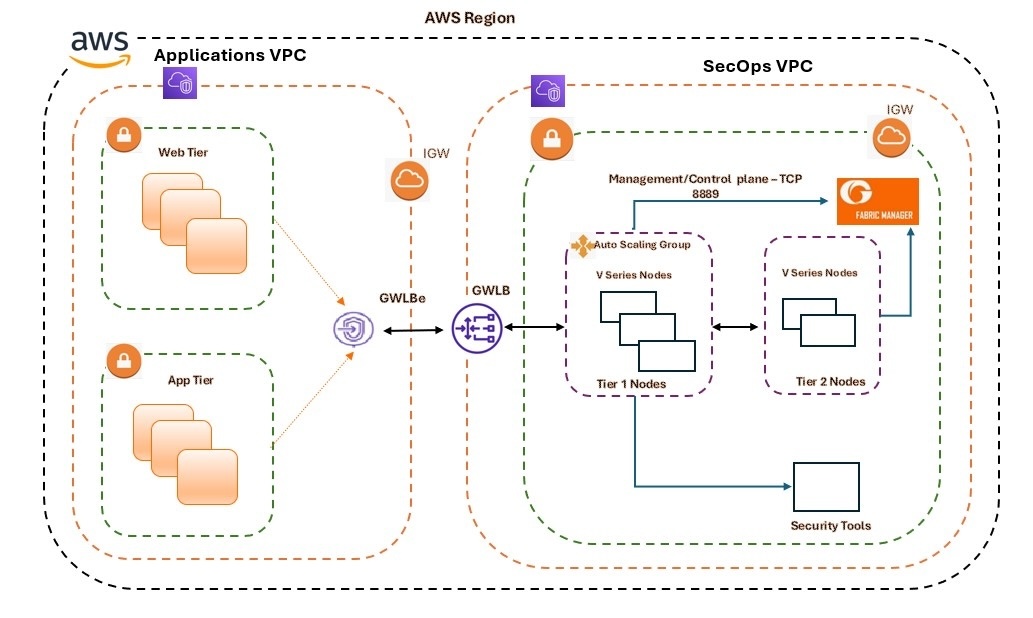
At a high level, Inline V Series sits behind a AWS Gateway Load Balancer
- GWLB endpoints are deployed in the application VPCs (virtual private clouds)
- A GWLB lives in an appliance VPC, where Inline V Series nodes are registered as GWLB targets
- Traffic to and from the application servers is steered through the GWLB endpoint, then to the Inline V Series nodes
- Inline V Series:
- Processes the inline flow and reinjects it back toward the GWLB.
- Takes a copy of every packet as out‑of‑band traffic and forwards it to GigaVUE V Series nodes.
- Through deep packet inspection, Gigamon extracts metadata from that traffic, which is in
turn sent to a SIEM. This level of Layers 2–7 visibility provides context well beyond NetFlow
and VPC Flow Logs.
From an app owner’s point of view, nothing changes on the EC2 instances themselves. All steering happens at the VPC/GWLB layer, under the control of GigaVUE‑FM fabric manager.
Key Components in the Architecture
An Inline V Series deployment in AWS typically includes:
- Application VPC
- Workload EC2 instances (web /app tier)
- Internet gateway (for North–South flows)
- One or more GWLB endpoints
- Appliance VPC
- AWS Gateway Load Balancer
- Inline V Series nodes registered as GWLB targets (often via Auto Scaling)
- Optional GigaVUE V Series nodes for additional out‑of‑band processing
- GigaVUE‑FM fabric manager
- Central orchestration for:
- Monitoring domains (Inline)
- Monitoring sessions that define which traffic to tap and where to send it
- Scaling and lifecycle of the V Series nodes
- Central orchestration for:
This separation lets you keep apps and tools decoupled, while still ensuring every selected flow passes through your inline inspection path.
What Happens to the Mirrored Copy?
Every packet that passes through Inline V Series can be mirrored out of band:
- The copy is encapsulated and sent to:
- GigaVUE V Series nodes for advanced processing (deduplication, slicing, masking, app filtering, metadata), or
- Directly to security and observability tools running in AWS or on‑prem
- You can design:
- Single‑tier deployments — Inline V Series taps, filters, and forwards directly to tools
- Multi‑tier deployments — Inline V Series taps, then sends to a second‑tier V Series for richer GigaSMART® and Gigamon Application Intelligence before hitting tools
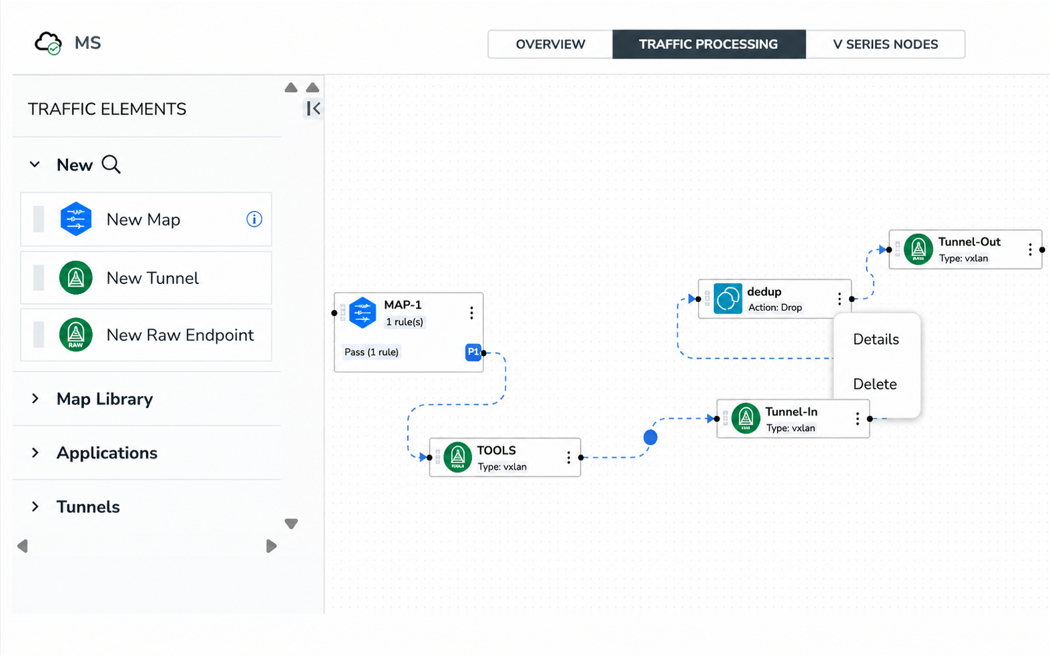
All of this is expressed as Monitoring Sessions in GigaVUE‑FM, so you’re not hand‑crafting tunnels and maps per V Series node; you define policy once and let GigaVUE FM push the specifics.
Deployment Types: When to Use Which
Inline V Series supports two main deployment patterns in AWS:
Single‑Tier Deployment
Use this when you:
- Need straightforward inline inspection and a mirrored copy to tools
- Want to keep the design simple: GWLB → Inline V Series → tools
- Are primarily focused on North–South visibility and enforcement (internet ingress/egress, cross‑VPC paths that can be routed through GWLB)
Multi‑Tier Deployment
Use this when you:
- Want a clean separation between inline acquisition and deep packet processing
- Need to apply heavier GigaSMART pipelines (for example, deduplication, advanced flow slicing, application filtering, metadata export) without overloading the inline tier
- Prefer a topology like:
- Tier 1: Inline V Series (acquisition + basic filtering)
- Tier 2: GigaVUE V Series (advanced processing, tool fan‑out)
This model makes it easier to evolve tools and processing independently of the inline insertion point.
Why Customers Care: Practical Benefits
Inline V Series is not just a new way to wire packets; it’s a way to bring datacenter‑grade visibility and enforcement into AWS, on AWS’s own terms.
Some of the advantages:
Feature | Advantages |
Agentless inline acquisition | No software on EC2 instances; traffic steering happens at GWLB and routing layers. |
Consistent enforcement and visibility | Every selected flow traverses the inline path, which enables consistent policy enforcement and lossless traffic capture for tools. |
Cloud-native scalability and resilience | Use GWLB health checks and Auto Scaling groups to right-size the inline tier. If a node fails, GWLB redistributes flows to healthy targets. |
Segregation of duties | Application teams maintain their own VPCs and workloads. Network/security teams manage visibility and inline services in the appliance VPC, centrally governed by GigaVUE-FM. |
Path to deeper observability | Combine Inline V Series with GigaVUE V Series for traffic optimization and Application Intelligence |
Closing Thoughts
Inline V Series brings inline inspection and deep observability to AWS in a way that respects how cloud networking works today. By pairing GWLB with GigaVUE V Series and GigaVUE‑FM, you get a repeatable, scalable pattern for seeing and securing the traffic that matters most — without forcing changes on your application teams.
If your current challenge is, “We know traffic is flowing, but we can’t see enough of it,” then Inline V Series is a strong candidate for your next AWS visibility design.

CONTINUE THE DISCUSSION
People are talking about this in the Gigamon Community’s Hybrid/Public Cloud group.
Share your thoughts today
