






 Dan Daniels
Migrating to the cloud is an important task for any modern organization, but proper planning is required. If you don’t have a clear roadmap for your migration, your organization can be left vulnerable to cyberattacks, data loss, and costly issues. Use a comprehensive cloud migration checklist to ensure that no step is overlooked, no matter how small.
Ready to get started? Read on for a thorough checklist for your upcoming cloud migration.
Key Takeaways
- A cloud migration checklist ensures a thorough, smooth, and secure transition.
- It’s important to compose a checklist for each step of your cloud migration, from pre-migration planning to post-migration optimization.
- Tailor your checklist to your organization’s specific requirements in terms of databases, applications, compliance requirements, and more.
Why Use a Cloud Migration Checklist?
When migrating your most important information, a thorough and smooth migration is essential. Without a cloud migration checklist, you may run into common pitfalls like unforeseen costs, security vulnerabilities, data corruption, and more. It can help your organization avoid downtime, data loss, or security gaps that can lead to potentially devastating issues down the line.
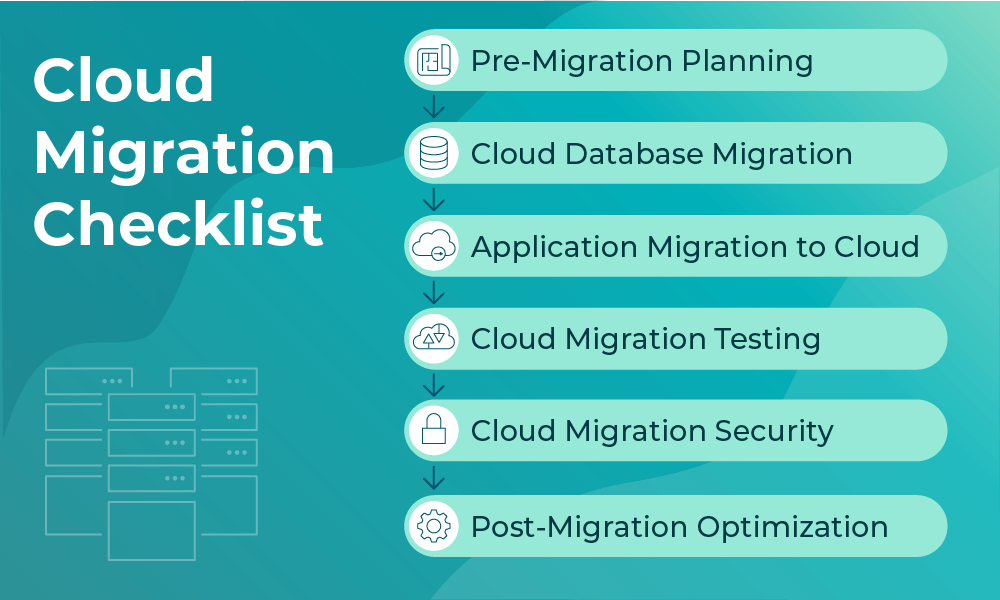
Cloud migration is a multifaceted process. For the best possible results, it’s important to have a separate checklist for the most crucial areas: an application migration-to-cloud checklist, migration of your database, a testing checklist, and a security checklist. Before you begin your transition, ensure you have a thorough checklist for your most important categories.
Pre-Migration Planning Checklist
Before beginning your migration, lay the foundations for success with a pre-migration planning checklist. This is your time to determine your cloud migration strategy. Include these items on your cloud migration checklist:
- Assess current IT infrastructure and dependencies: Begin by taking an inventory of your current IT infrastructures and dependencies, including applications, servers, databases, network components, and more.
- Define migration goals and KPIs: Make a defined list of the goals you wish to achieve through your cloud migration. For instance, create cost goals, performance goals, or compliance goals, and identify KPIs that will give you a good understanding of your success.
- Choose the right cloud provider and migration model: Now that you understand the pieces involved in your migration and your goals, it’s time to choose a cloud provider and migration model to help you achieve those goals. You may choose to use infrastructure as a service (IaaS), platform as a service (PaaS), software as a service (SaaS), or a combination of these service models.
- Perform risk assessments and cost analysis: Take the time to identify risks that may arise during your migration and conduct a cost analysis to set clear expectations.
Cloud Database Migration Checklist
With a cloud database migration checklist, you’ll be able to migrate with minimal downtime and set yourself up for optimal results. Follow these steps:
- Inventory all databases and assess compatibility with target cloud services: Ensure your current databases, including their sizes and workloads, are compatible with your target cloud database services.
- Choose migration strategy: Common migration strategies include lift-and-shift, refactor, or a total rearchitect.
- Back up all data prior to migration: Back up each database and store it in a secure location that won’t be affected by your upcoming migration.
- Conduct schema conversion and data validation: Convert your schema wherever necessary using tools like AWS SCT or Azure DMA. Be sure to validate your data to ensure it’s translated correctly.
- Plan for downtime or replication during cutover: Depending on your migration setup, you may need to plan for downtime, as in the case of an offline migration, or schedule a cutover for a live replication.
- Post-migration performance benchmarking: Once you’ve migrated your cloud database, check for common performance benchmarks like latency, query speed, and resource utilization. Then, compare these results to your pre-migration results to identify potential concerns.
Application Migration to Cloud Checklist
Next, it’s time to move your applications to the cloud. Use this application migration to cloud checklist to ensure a low-risk migration with strong results:
- Audit existing applications and their cloud readiness: Begin by auditing your existing applications’ architecture, resource usage, and other factors. Some may allow for a lift-and-shift, whereas others may require rearchitecting.
- Determine app-specific dependencies and configurations: Look for app-specific dependencies on databases, APIs, and more. Then, document runtime configurations and licensing requirements.
- Decide on containerization, virtualization, or re-platforming: Choose from common deployment models: virtualization, which creates virtual versions of physical resources; containerization, which packages applications and dependencies into distinct containers; or re-platforming, in which case you’ll optimize your applications after migration.
- Establish rollback plans and performance baselines: If migration doesn’t go as expected, it’s essential to have a plan. Create a strategy to restore your original server if migration fails or doesn’t go as planned.
- Conduct incremental migration: Perform a test migration of a non-essential application and look for any potential issues. Use what you’ve learned to roll out your complete migration.
Cloud Migration Testing Checklist
There are many different testing requirements involved in a cloud migration. Follow this cloud migration testing checklist:
- Pre-migration testing: Stage a test environment that closely mimics your production environment. Practice your migration in this setup, identify potential concerns, and adjust accordingly.
- Functional testing post-migration: After your migration, test to make sure all applications, APIs, and more are working correctly.
- Load and stress testing to ensure performance benchmarks are met: Run test scenarios with heavy traffic loads and run high-resource applications to stress-test your new environment.
- Security and compliance testing: Scan for potential vulnerabilities, encryption errors, and more, and ensure all compliance needs are being met.
- Connectivity and user experience validation: Test connectivity between applications, users, and networks. Look for common issues like latency, slow page load times, and other potential concerns.
- Continuous monitoring setup: Employ a suite of monitoring tools for network visibility to continuously audit performance over time.
Cloud Migration Security Checklist
It’s essential to ensure your cloud migration is secure and doesn’t expose data or leave vulnerabilities that attackers can exploit. Use this cloud migration security checklist to confirm:
- Data encryption in transit and at rest: Make sure all data is encrypted both in transit and at rest. To do so, use encryption methods like TLS and your cloud provider’s built-in key management services.
- Identity and access management (IAM) configuration: Manage all access using a least-privilege approach. Use Zero-Trust architecture, multi-factor authentication, and role-based access control to minimize the attack surface.
- Set up firewalls, DDoS protection, and other security tools: Protect your workload using security tools like firewalls, DDoS protection, IDS/IPS, and endpoint security measures.
- Compliance checks: Ensure your new cloud meets all compliance requirements like GDPR, HIPAA, SOC 2, and more.
- Continuous threat detection and response planning: Use a deep observability pipeline for real-time activity monitoring. Set up an action plan for potential security breaches.
Post-Migration Optimization
After your migration is complete, it’s time to optimize. Follow these cloud migration best practices for continual improvement of your cloud:
- Monitor performance and costs: Continuously monitor your cloud for performance, system, and user concerns, as well as costs associated with waste or unexpected spikes in usage.
- Optimize resource allocation: Use autoscaling for dynamic workloads that match your network demand. Use reserved instances to save money during times of standard usage.
- Train teams on new cloud tools and processes: Provide thorough and continuous training to operations, development, security, and IT teams.
- Set up regular audits and patch management cycles: Regularly audit your cloud and make changes as needed. Automate patching to minimize vulnerabilities.
Putting It All Together
With the help of a cloud migration checklist, your organization can migrate smoothly while saving costs and maintaining a secure environment. This list sets the foundation for your upcoming cloud migration and helps dispel cloud migration myths by giving your team a structured, proven approach.
At the same time, keep in mind that it’s important to tailor your checklist to your specific environment. Be sure to create a thorough list for each step of the migration process and each facet of your network.
The Gigamon suite of cloud visibility and security solutions are a vital part of an efficient and secure cloud migration, and a Gigamon support team can help your organization execute this checklist effectively. To ensure your team’s cloud migration goes as smoothly as possible, connect with a Gigamon sales representative to get set up with the tools you need to succeed.

CONTINUE THE DISCUSSION
People are talking about this in the Gigamon Community’s Hybrid/Public Cloud group.
Share your thoughts today
